
Key Takeaways:
- Business process automation workflows reduce manual effort by 40–70% across core operational functions when properly designed and deployed.
- The most effective automation workflows map to repeatable, rule-based processes with clear inputs, outputs, and decision points.
- Modern automation combines no-code/low-code platforms, AI-assisted decisioning, and API integrations — not just simple triggers and actions.
- Mid-market companies can deploy a first automation workflow in 2–4 weeks with ROI typically visible within the first quarter.
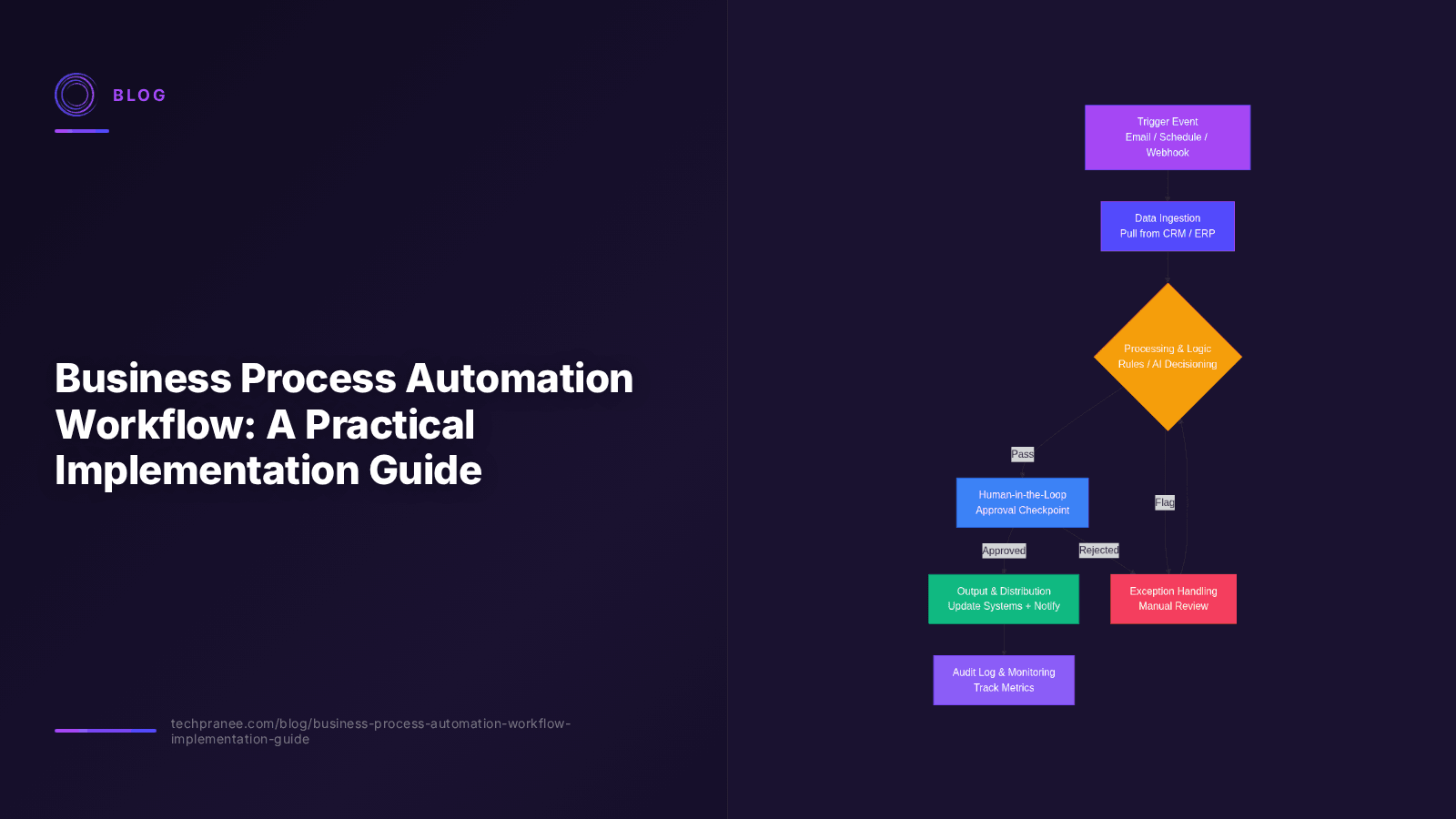
- A well-architected workflow includes five layers: trigger, data ingestion, processing/logic, human-in-the-loop checkpoints, and output/distribution.
Business Process Automation Workflow: A Practical Implementation Guide
Business process automation workflows have moved from a nice-to-have efficiency play to a competitive necessity. According to McKinsey's 2025 State of AI report, 72% of organizations have now adopted at least one automation workflow in production — up from 55% in 2023. But adoption and effectiveness are not the same thing. Many automation initiatives stall because teams automate the wrong processes, build brittle workflows, or skip the design fundamentals that make automation durable at scale.
This guide breaks down what a business process automation workflow actually is, how to identify the right processes to automate, how to architect a workflow that holds up under real-world conditions, and how to measure the results. Whether you are starting with your first automation or expanding across an enterprise, the framework here will help you move from ad-hoc scripting to a systematic automation practice that compounds over time.
What Is a Business Process Automation Workflow?
A business process automation workflow is a structured, software-driven sequence of steps that executes a repeatable business process without continuous human intervention. Unlike a one-off script or macro, an automation workflow is designed to run consistently, handle edge cases, integrate with multiple systems, and produce auditable outputs.
The key distinction is between process automation and task automation. Task automation handles a single action — say, moving a file or sending an email. Process automation orchestrates an entire workflow end-to-end: data enters from a trigger, passes through validation, decision logic, human checkpoints where needed, and exits as a completed business outcome like an approved invoice, an onboarded employee, or a fulfilled order.
The Five Layers of an Automation Workflow
Every robust business process automation workflow, regardless of the platform, contains these five layers:
| Layer | Function | Example |
|---|---|---|
| Trigger | The event that starts the workflow — scheduled, event-based, or manual | New form submission, daily 9 AM schedule, webhook from CRM |
| Data Ingestion | Collecting and normalizing inputs from source systems | Pull customer data from CRM, fetch order details from ERP |
| Processing & Logic | The decisioning engine — rules, AI models, calculations, branching | Route based on order value; flag if amount > $10K for review |
| Human-in-the-Loop | Checkpoint where a person reviews, approves, or corrects before the workflow continues | Manager approval for invoices over $5,000 |
| Output & Distribution | Delivering the result to downstream systems and stakeholders | Update ERP status, send confirmation email, log to audit trail |
When a workflow is missing one of these layers — most commonly the human-in-the-loop checkpoint or the audit output — it tends to fail silently in production. A trigger fires, data flows, but nobody catches the error when something unusual happens. The five-layer model is what separates a demo from a deployment.
Identifying the Right Processes to Automate
The most common automation mistake is starting with the most painful process rather than the most automatable one. A process that is painful but highly variable, judgment-heavy, and poorly documented will burn weeks of effort and produce a fragile workflow. A process that is moderately painful but highly repeatable, rule-based, and well-documented will deliver fast ROI and build internal momentum for broader automation.
The Automation Readiness Scorecard
Before automating any process, score it against these six criteria. A process scoring 5+ on this checklist is a strong automation candidate:
- ✓ Frequency: The process runs at least weekly (ideally daily)
- ✓ Repeatability: Steps are largely identical each run, with limited variation
- ✓ Rule-based logic: Decisions follow defined rules, not subjective judgment
- ✓ Defined inputs and outputs: You know what data enters and what should exit
- ✓ Digital inputs: Data already exists in a system (not paper or email-only)
- ✓ Error tolerance: A failure is recoverable and not catastrophic
Processes that score low on frequency or repeatability — like one-off strategic decisions or highly bespoke client engagements — are poor automation candidates. Processes that score low on rule-based logic but high on everything else may benefit from AI-assisted decisioning rather than pure rule-based automation.
High-Value Automation Targets by Department
| Department | Top Automation Candidates | Typical Time Savings |
|---|---|---|
| Finance | Invoice processing, expense approvals, reconciliation, accounts payable | 60–80% |
| HR | Employee onboarding, PTO requests, benefits enrollment, offboarding | 50–70% |
| Operations | Order fulfillment, inventory reordering, vendor onboarding, quality checks | 40–60% |
| Sales | Lead routing, quote generation, contract renewal reminders, CRM data entry | 30–50% |
| IT | Access provisioning, ticket routing, password resets, system health alerts | 70–90% |
| Customer Support | Ticket triage, escalation routing, status updates, satisfaction surveys | 40–60% |
Gartner's 2025 automation benchmark found that finance and IT consistently deliver the highest ROI for first-wave automation, with payback periods under 6 months. Sales and operations follow in a second wave once the automation team has built reusable integration patterns and internal trust.
How to Design a Business Process Automation Workflow
Designing an automation workflow is a design problem, not a coding problem. The most successful automation teams spend 60% of their effort on process mapping and edge-case analysis before touching a platform. Here is a proven step-by-step approach:
Step 1: Map the Current Process
Document the as-is process in detail — every step, decision point, handoff, system involved, and exception path. Use a flowchart or process mining tool. Interview the people who actually execute the process (not just the process owner). The gap between the documented process and the real process is where automation projects die.
Step 2: Identify Bottlenecks and Manual Touchpoints
In your mapped process, mark every point where a human currently intervenes. Classify each as: (a) required judgment, (b) data lookup that could be automated, (c) approval that follows a rule, or (d) manual data entry. Categories (b), (c), and (d) are automation targets. Category (a) stays human or moves to AI-assisted decisioning.
Step 3: Define the Automation Scope
Do not try to automate the entire process on the first pass. Pick the most automatable segment — usually a sub-workflow with clear boundaries. Automate that, measure it, and expand. This iterative approach reduces risk and builds confidence. A first workflow that handles 70% of cases well is better than an ambitious one that handles 100% poorly.
Step 4: Select the Platform
Choose your automation platform based on integration requirements, not feature checklists. The platform that integrates natively with your existing systems (CRM, ERP, ticketing, email) will deliver faster than the one with the most features. Consider no-code platforms like n8n for rapid prototyping, low-code platforms like Make or Zapier for SMB workflows, and enterprise platforms like Power Automate or Workato for complex governance requirements.
Step 5: Build, Test, and Deploy
Build the workflow in a staging environment first. Test with real (anonymized) data, not synthetic data. Run it in parallel with the manual process for 2–4 weeks — compare outputs and catch discrepancies. Only cut over to automation-only when error rates are below your threshold (typically <1% for financial processes, <3% for operational ones).
Step 6: Monitor and Optimize
Automation is not set-and-forget. Every workflow needs monitoring: success rate, execution time, exception rate, and business outcome metrics. Set up alerts for failure spikes. Review the workflow quarterly to handle process drift — when the underlying business process changes, the automation needs to change with it.
Common Workflow Patterns
Most business process automation workflows fall into a small number of reusable patterns. Recognizing the pattern helps you design faster and avoid reinventing the wheel.
Pattern 1: Sequential Approval Workflow
The most common pattern: a request moves through a defined approval chain, with each approver either advancing, rejecting, or returning the request. Example: purchase requisitions, expense reports, PTO requests. The key design decision is the routing rule — by amount threshold, department, or project type.
Pattern 2: Data Synchronization Workflow
A scheduled or event-triggered workflow that keeps two systems in sync. Example: syncing CRM contacts to marketing automation, or pushing ERP order status to a customer portal. The critical design element is conflict resolution — what happens when both systems update the same record.
Pattern 3: Intake and Triage Workflow
Incoming items (tickets, leads, applications, claims) are categorized, prioritized, and routed to the right handler or automated path. AI-assisted classification is increasingly common here. Example: support ticket triage, lead scoring and routing, insurance claim intake.
Pattern 4: Multi-Step Onboarding Workflow
A new entity (employee, customer, vendor) triggers a coordinated sequence of setup tasks across multiple systems: create accounts, assign permissions, send welcome communications, schedule training. This pattern benefits from a "checklist with dependencies" design where each step has preconditions.
Measuring Automation ROI
Quantifying automation ROI requires measuring both direct savings and indirect benefits. Direct savings are straightforward: hours saved multiplied by loaded labor cost. Indirect benefits — faster cycle times, reduced error rates, improved compliance, employee satisfaction — are harder to measure but often larger.
| Metric | What It Measures | How to Calculate |
|---|---|---|
| Hours Saved | Direct labor reduction | (Manual time per run × frequency) − (Automated time per run × frequency) |
| Cycle Time Reduction | Speed improvement | (Manual cycle time − Automated cycle time) / Manual cycle time |
| Error Rate Reduction | Quality improvement | (Manual error rate − Automated error rate) / Manual error rate |
| Cost per Transaction | Unit economics | (Platform cost + maintenance labor) / transactions processed |
| Automation Reliability | Operational health | Successful runs / Total attempted runs |
"The automation initiatives that deliver compounding ROI are not the ones that save the most hours — they are the ones that are reliable enough to become invisible infrastructure. When teams stop thinking about the workflow and just trust the output, you have succeeded." — BCG Digital Automation Study, 2025
A practical benchmark: a well-designed first automation workflow should deliver a payback period under 12 months, achieve 95%+ reliability within the first quarter, and free up at least 1.5 full-time equivalent (FTE) hours per week. If you are not hitting these numbers, the issue is usually process selection or scope — not the platform.
When to Add AI to Your Automation Workflow
The rise of generative AI and LLMs has expanded what automation workflows can do. Traditional rule-based automation handles structured data and deterministic logic well. AI-assisted automation extends this to unstructured data — emails, documents, chat transcripts, images — and probabilistic decisions.
The decision to add AI should be driven by process characteristics, not hype. Use AI when:
- ✓ The process involves unstructured data (documents, emails, PDFs) that rules cannot parse reliably
- ✓ Classification decisions have many valid categories (not a simple if/else)
- ✓ The process requires natural language understanding or generation
- ✓ Rules-based logic would require hundreds of branches to cover real-world variation
Do not add AI when the process is purely structured, deterministic, and well-defined — a rules engine is faster, cheaper, more auditable, and more reliable. For more on this distinction, see our no-code business process automation guide, which covers when no-code platforms outperform custom AI builds.
Real-World Example: Automating Accounts Payable
Consider a mid-market company processing 800 invoices per month manually. The as-is workflow: invoice arrives in email, an AP clerk enters it into the ERP, routes it to the department head for approval, matches it to the PO, and schedules payment. Manual processing time: 12 minutes per invoice. Error rate: 4%. Average cycle time: 9 days.
The automated workflow:
- Trigger: Invoice email arrives → AI document extraction parses vendor, amount, line items, PO number
- Validation: System matches invoice to PO and receipt automatically; flags mismatches
- Routing: Invoices under $5K with clean PO match auto-approve; over $5K route to department head
- Human checkpoint: Manager reviews only flagged and high-value invoices (15% of total)
- Output: Approved invoices auto-scheduled for payment in ERP; confirmation logged
Results after deployment: processing time dropped to 2 minutes per invoice (83% reduction), error rate fell to 0.8%, cycle time shortened to 2 days, and the AP team shifted from data entry to exception handling and vendor relationship management. This is the pattern we implemented for Zovia's invoice processing — the same architecture applies across industries.
Practical Action Items
Ready to build your first business process automation workflow? Here are concrete next steps:
- Audit your processes: List your team's top 10 time-consuming repeatable tasks and score each against the Automation Readiness Scorecard above. Pick the highest-scoring one.
- Map it end-to-end: Spend a full day documenting the current process with the people who execute it. Identify every manual touchpoint and classify it.
- Choose your platform: Start with a no-code tool if your integrations are simple; escalate to low-code if you need complex logic or custom connectors.
- Build a MVP workflow: Automate one sub-process, not the whole thing. Test with real data in staging for two weeks.
- Measure and expand: Track hours saved, error rate, and cycle time. Once the first workflow is stable, apply the same pattern to the next process on your list.
If you want help architecting or implementing a business process automation workflow tailored to your operations, learn more about our automation services or reach out for a consultation. We help mid-market and enterprise teams move from manual processes to reliable, scalable automation — usually starting with a 2-week proof of concept on your highest-impact process.
Frequently Asked Questions
What is the difference between business process automation and robotic process automation (RPA)?
Business process automation (BPA) orchestrates entire workflows across multiple systems using APIs, logic, and integrations. RPA mimics human actions at the user interface level — clicking buttons, copying data between screens. BPA is more durable and scalable because it works through APIs rather than brittle UI interactions. RPA is useful for legacy systems without APIs, but most modern automation combines both approaches or favors API-based BPA.
How much does it cost to build a business process automation workflow?
A first automation workflow typically costs between $5,000 and $25,000 for design, build, and deployment, depending on complexity and integration requirements. Ongoing platform costs range from $50/month (basic no-code) to $2,000+/month (enterprise platforms). Most organizations see ROI within the first 3–6 months. For a detailed breakdown, see our AI automation cost guide.
Do I need developers to build automation workflows?
Not for most workflows. Modern no-code and low-code platforms let business analysts and operations teams build and maintain automation workflows without writing code. You need developers only for custom integrations with systems lacking native connectors, or for complex AI-assisted logic. Most first-wave automation can be built entirely by non-technical teams with platform training.
How long does it take to implement business process automation?
A single workflow typically takes 2–4 weeks from process mapping to deployment, assuming the process is well-documented and integrations are available. Complex workflows with custom integrations or AI components can take 6–12 weeks. The key is starting with a well-scoped process and expanding iteratively rather than attempting a large-scale rollout upfront.
What are the most common reasons automation workflows fail?
The top three failure causes are: (1) automating the wrong process — too variable, judgment-heavy, or poorly defined; (2) skipping edge-case analysis — the workflow works for 80% of cases but breaks on the other 20%; and (3) no monitoring or maintenance plan — the workflow drifts as the underlying business process changes and nobody notices until it fails.
Can I automate processes that involve sensitive or regulated data?
Yes, but automation workflows handling sensitive data (financial, healthcare, PII) need additional controls: encryption in transit and at rest, access logging, audit trails, and compliance validation. Choose platforms with SOC 2 Type II or equivalent certifications. For regulated industries like healthcare or finance, work with an automation partner who understands the compliance requirements — see our healthcare automation guide for industry-specific considerations.